 Naqood
How to file VAT in UAE – Step-by-Step Guide
Filing VAT in the UAE can seem complex, but with the right guidance, you can complete the process smoothly. This step-by-step guide will show you exactly how to file VAT in UAE using Naqood and EmaraTax, ensuring compliance with the Federal Tax Authority (FTA).
Step 1 - Go to Naqood
First go to Naqood
Open Reports
Select VAT
-1.png)
Step 2 - Select VAT Periode
Choose the VAT period you want to file for
In this example, we’re filing for 1/11/2025 – 31/01/2026
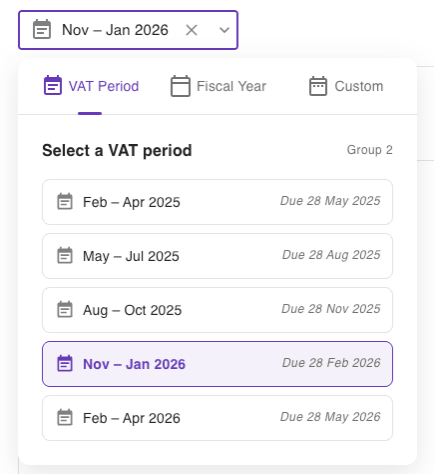
You can change your stagger periode under settings -> VAT return cycle
Step 3 - Download to excel
Click on Download VAT Report to export it to Excel
-3.png)
Step 4 - Login to EmaraTax
Go to EmaraTax.
Login with UAE PAS
-4.png)
Step 5 - Select VAT
Select VAT
Find “My Fillings”
Press View all
-5.png)
-6.png)
Step 6 - Confirm and start
Tick the box “I confirm that I am authorized…”
Press Start
-7.png)
Step 7 - Upload template
Click Upload Filled Template
-8.png)
Step 8 - Select Naqood template
Upload the Excel template you downloaded from Naqood in Step 3
-9.png)
Step 9 - Check the input data
Verify that all the amounts and fields have been correctly filled
Click Next Step
-10.png)
-12.png)
Step 10 - Submit
Review your VAT filing
Tick the declaration box “I declare that the information provided is true…”
Press Submit
-13.png)
-14.png)
Step 11 - Pay
Your VAT return has now been submitted
Proceed by clicking Pay to finalize the process
-15.png)