 Naqood
How to Register for Corporate Tax in the UAE (2026 Step by Step Guide)
Every UAE company, including Free Zone companies, must register for Corporate Tax with the Federal Tax Authority (FTA), even if it expects to pay 0% tax. Registration is done online on EmaraTax, it is free of charge, and the FTA estimates about 25 minutes to submit the application and up to 20 business days to approve it (FTA Corporate Tax Registration service page, checked 1 November 2026).
This guide covers who must register, the deadlines, the documents to prepare, and then every EmaraTax screen step by step.
Who must register for Corporate Tax in the UAE?
- Companies (juridical persons): every company that is subject to Corporate Tax, such as an LLC, a joint stock company or a Free Zone company (FZCO or FZE). There is no revenue threshold for companies.
- Individuals (natural persons): a person who runs a business in the UAE must register when the business turnover is above AED 1 million in a calendar year. Salary, private investment income and real estate investment income do not count towards the AED 1 million.
- Branches: a UAE branch of a UAE company is part of the head office, so it does not register separately.
Registering does not mean you will pay tax. Taxable income up to AED 375,000 is taxed at 0%, and many small businesses can also elect Small Business Relief. You still need a Corporate Tax registration to file the return and claim the relief.
Corporate Tax registration deadline
The deadlines are set by FTA Decision No. 3 of 2024:
| Who | Deadline to apply |
|---|---|
| Company incorporated in the UAE on or after 1 March 2024 (mainland or Free Zone) | Within 3 months from the date of incorporation |
| Company incorporated before 1 March 2024 | Deadlines ran from May to December 2024 based on the licence issue month, so register now if you have not |
| Foreign company managed and controlled in the UAE | Within 3 months from the end of its financial year |
| UAE resident individual with business turnover above AED 1 million | By 31 March of the following calendar year |
For a new company, the 3 month clock starts on the incorporation date on your licence or certificate of incorporation, not on the date you start trading.
Penalty for late Corporate Tax registration
The FTA charges an administrative penalty of AED 10,000 for late Corporate Tax registration.
Under the FTA’s late registration penalty waiver, the penalty is waived (or credited back to your EmaraTax account if you already paid it) when you file your first Corporate Tax return, or annual declaration for exempt persons, within 7 months from the end of your first tax period. The waiver applies to the first tax period only, and no separate request is needed. If you miss that 7 month window, the penalty stays.
Documents you need before you start
Have these ready as PDF files (maximum 15 MB per file):
- Trade licence, including branch licences if you have any
- Certificate of incorporation, Memorandum of Association or partnership agreement
- Emirates ID and passport of every owner holding 25% or more
- Emirates ID or passport of the authorised signatory
- Proof of authorisation for the signatory, such as the Memorandum of Association or a Power of Attorney
- Your UAE PASS login for EmaraTax
Step 1: Log in to EmaraTax
Visit EmaraTax and log in using your UAE PASS.
Step 2: Create a Taxable Person Profile
Once logged in, click “Create New Taxable Person Profile” and fill out the following fields:
- Profile Name in English
- Profile Name in Arabic
- Preferred Language (English or Arabic)
- Preferred Communication (Email, or both Email and SMS)
- Upload Taxable Person Logo (optional)
Then click Create to continue.
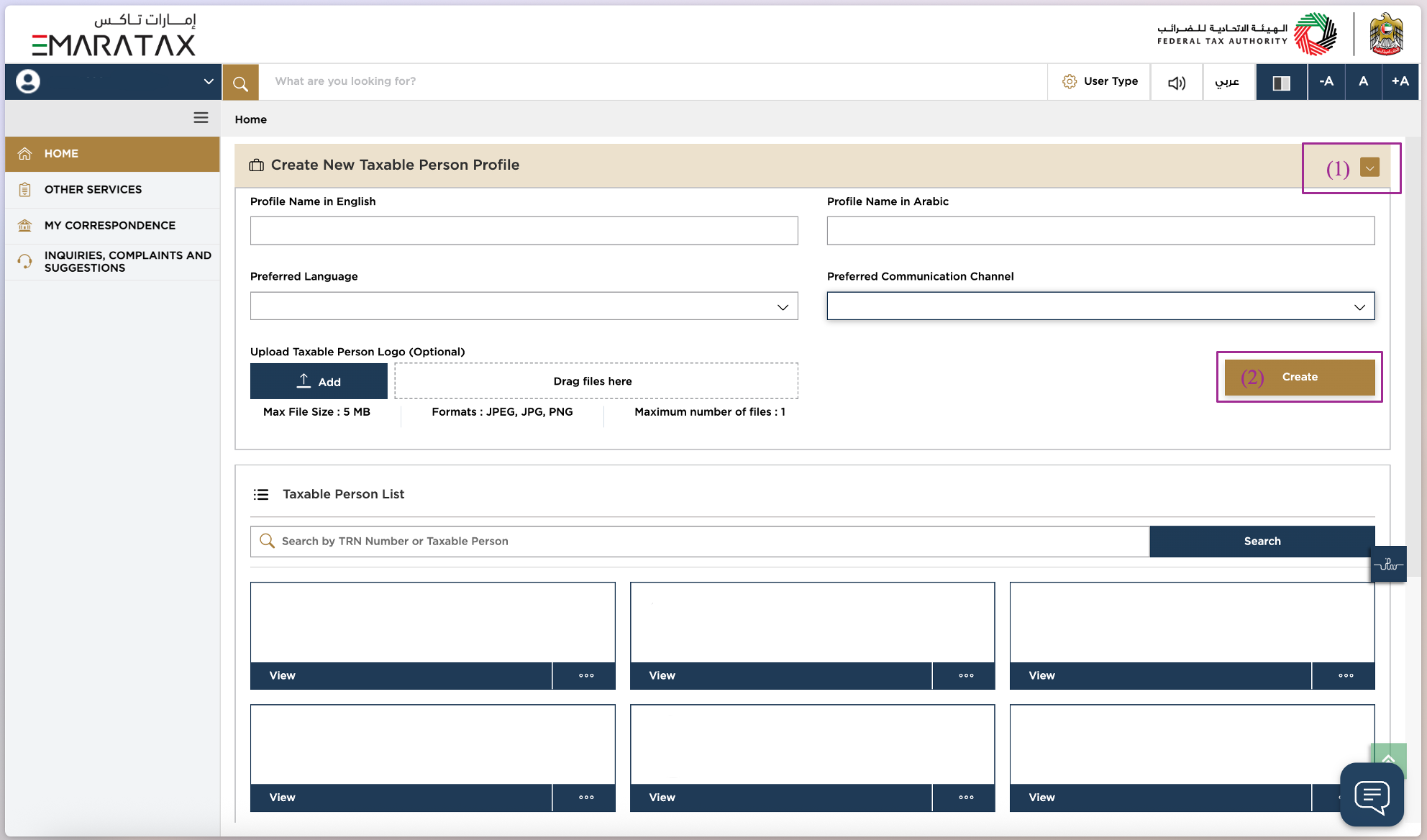
If your company is already registered for VAT, you will usually already have a Taxable Person profile. In that case, open it and go straight to Step 3.
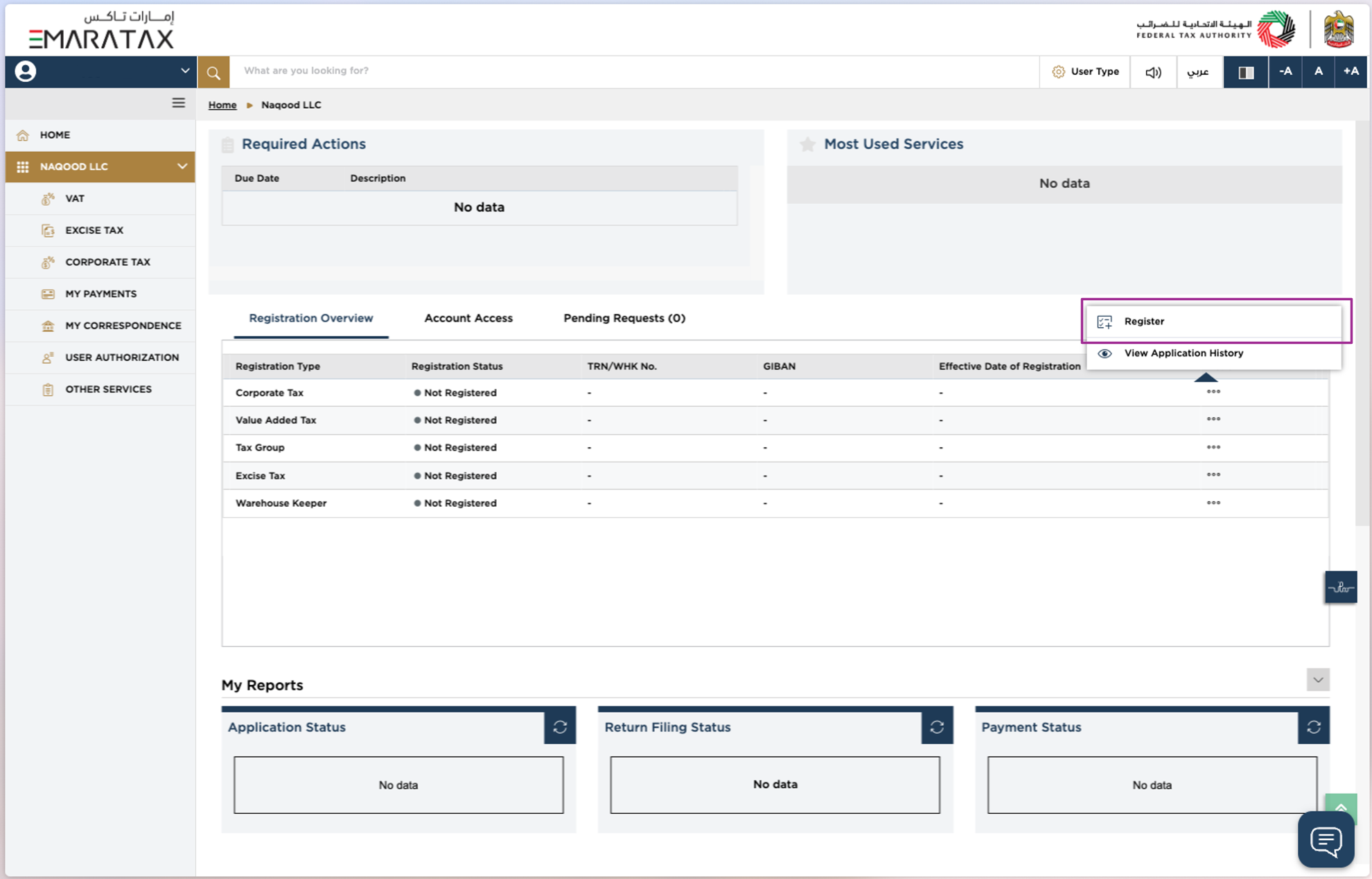
Step 3: Start Corporate Tax Registration
- Go to the Taxable Person Profile you just created
- Find Corporate Tax
- Click the three dots and select Register
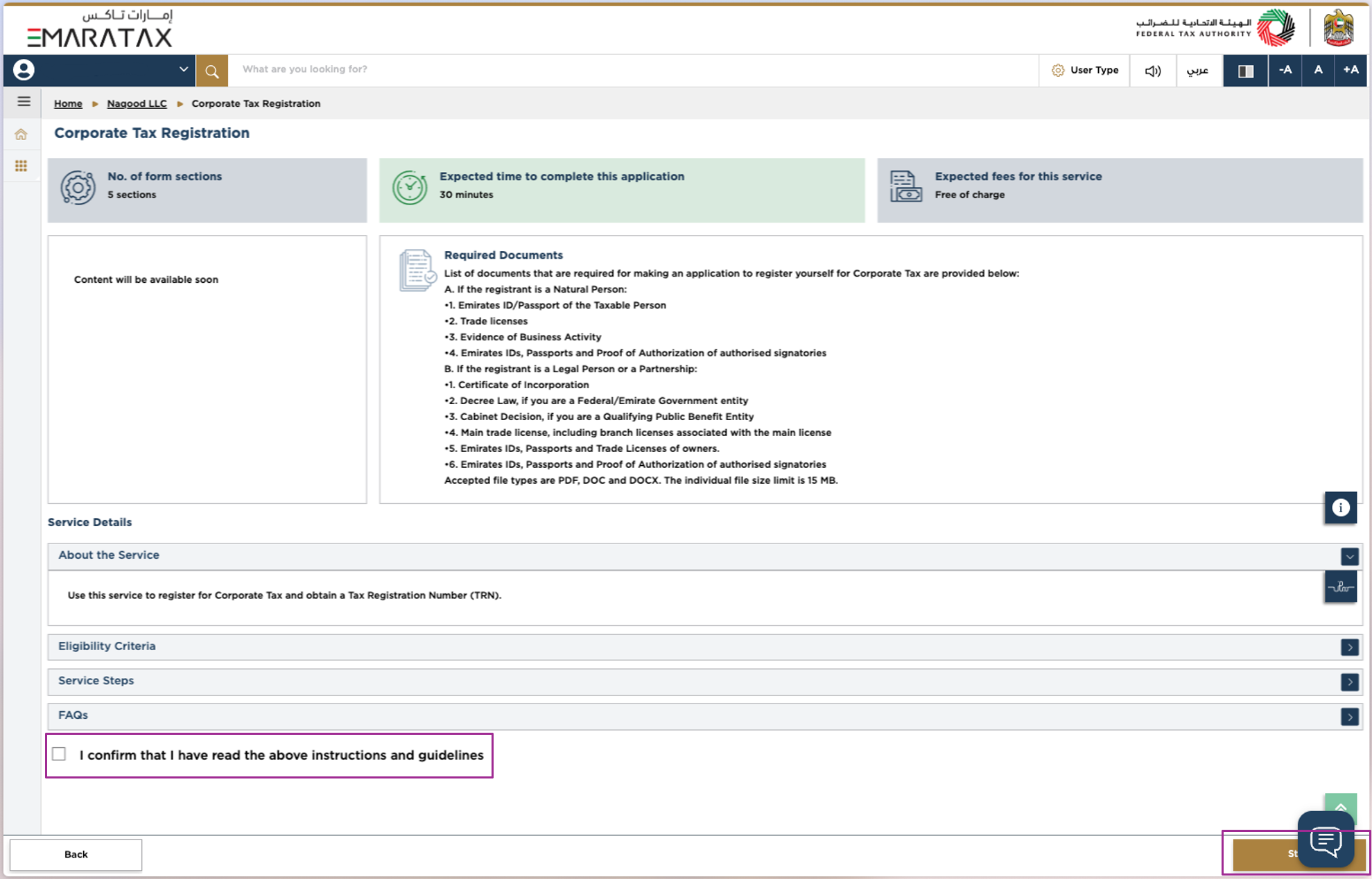
Step 4: Accept and Continue
Review the FTA terms and press Accept and Continue to move forward.
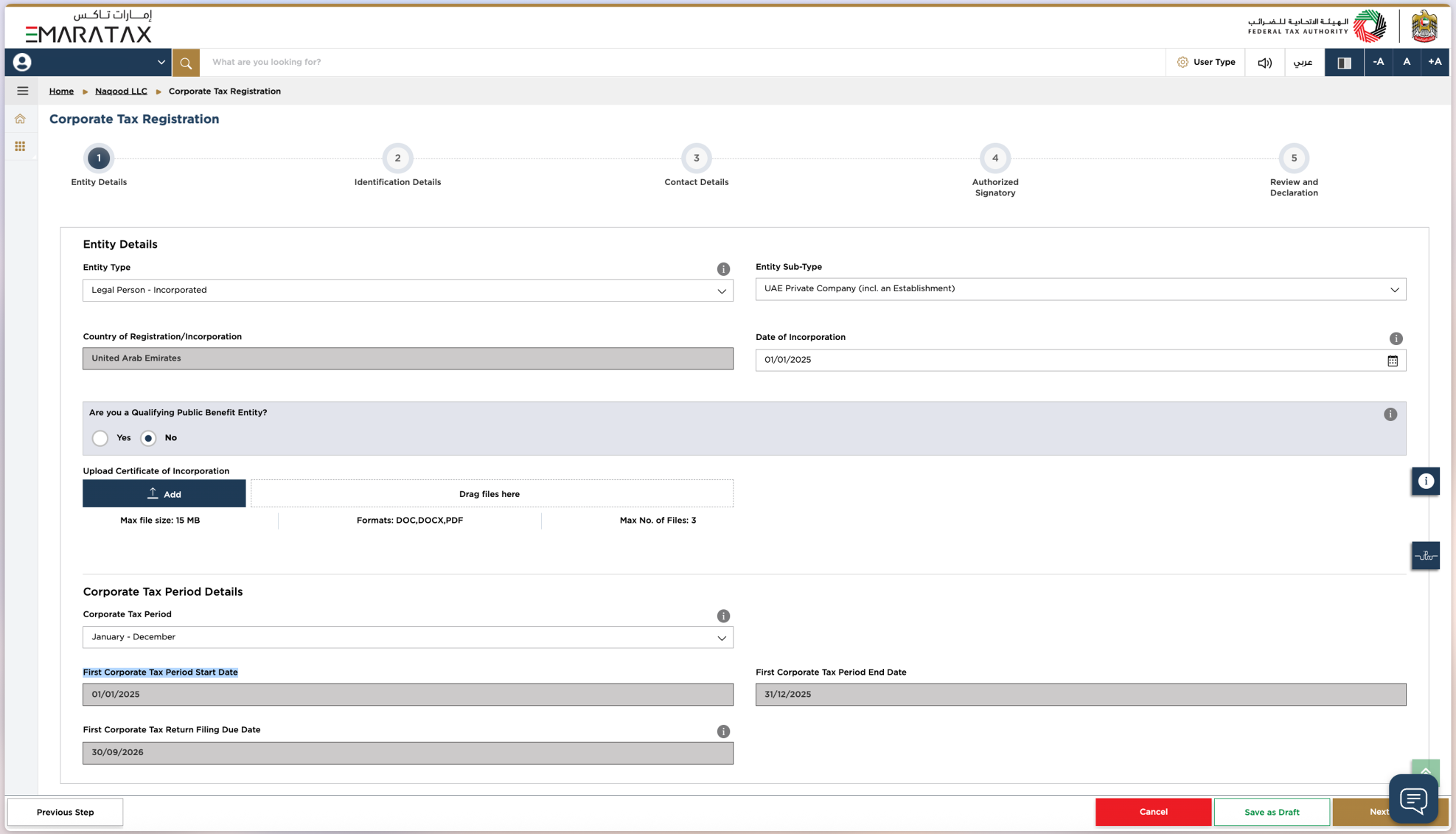
Step 5: Fill in Entity Details
1. Entity Type
Select your business’s legal structure:
- Natural Person
- Legal Person: Incorporated (for LLCs, Free Zone companies and more)
- Legal Person: Foreign Business
- Legal Person: Club or Association
- Legal Person: Charity
- Legal Person: Federal Government Entity
- Legal Person: Emirate Government Entity
- Legal Person: Other
- Partnership
For help choosing, read our full guide to FTA Entity Types in the UAE.
Most Naqood users are a “Legal Person: Incorporated”, since this covers a company incorporated in the UAE, such as a Limited Liability Company (LLC), a Free Zone company (FZCO), a Private Joint Stock Company or a Public Joint Stock Company (PJSC).
2. Entity Sub-Type
If you select Legal Person: Incorporated, you also need to select an Entity Sub-Type. The 4 types are:
- UAE Private Company (Incl. an establishment)
- Public Joint Stock Company
- Foundation
- Trust
Most Naqood users are a UAE Private Company (Incl. an establishment), since this covers Limited Liability Companies (LLC), Free Zone companies (FZCO) and sole establishments.
3. Date of Incorporation
Enter the incorporation date found on your Trade Licence. This is also the date your 3 month registration deadline counts from.
4. Are you a Qualifying Public Benefit Entity?
Press Yes if your entity is listed in Cabinet Decision No. 37 of 2023 or is registered as a non-profit, foundation, or charity aligned with public benefit objectives.
Press No if you are a for-profit business or not on the approved list.
5. Upload Certificate of Incorporation
6. Corporate Tax Period
This is a 12 month period. Most Naqood users select January to December to match the calendar year. Read more about tax periods.
- Start Date: Typically the same as your Incorporation Date.
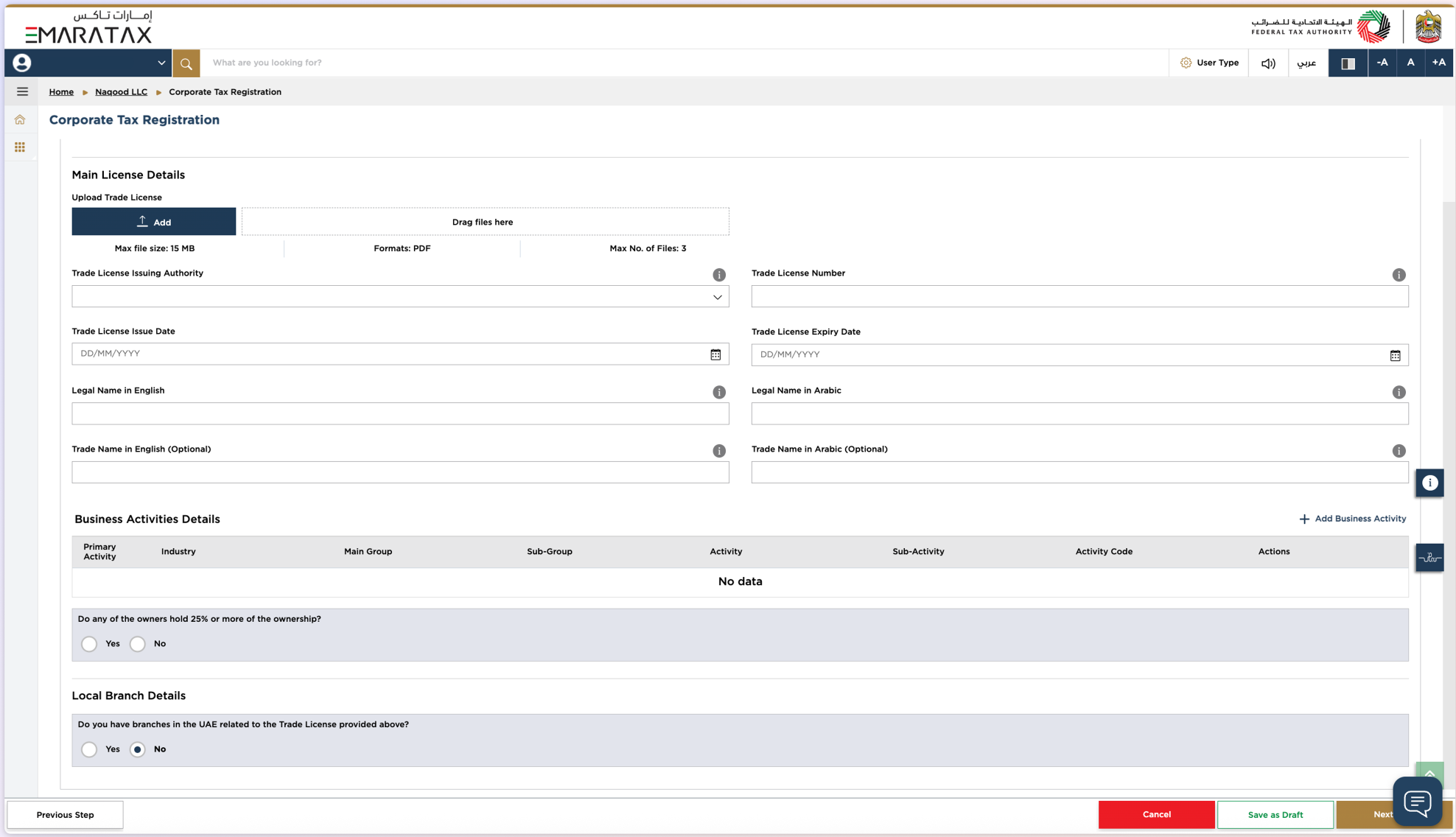
Step 6: Identification Details
Fill in the following:
- Trade Licence Issuing Authority
- Trade Licence Number
- Trade Licence Issue Date
- Trade Licence Expiry Date
- Legal Name in English
- Legal Name in Arabic
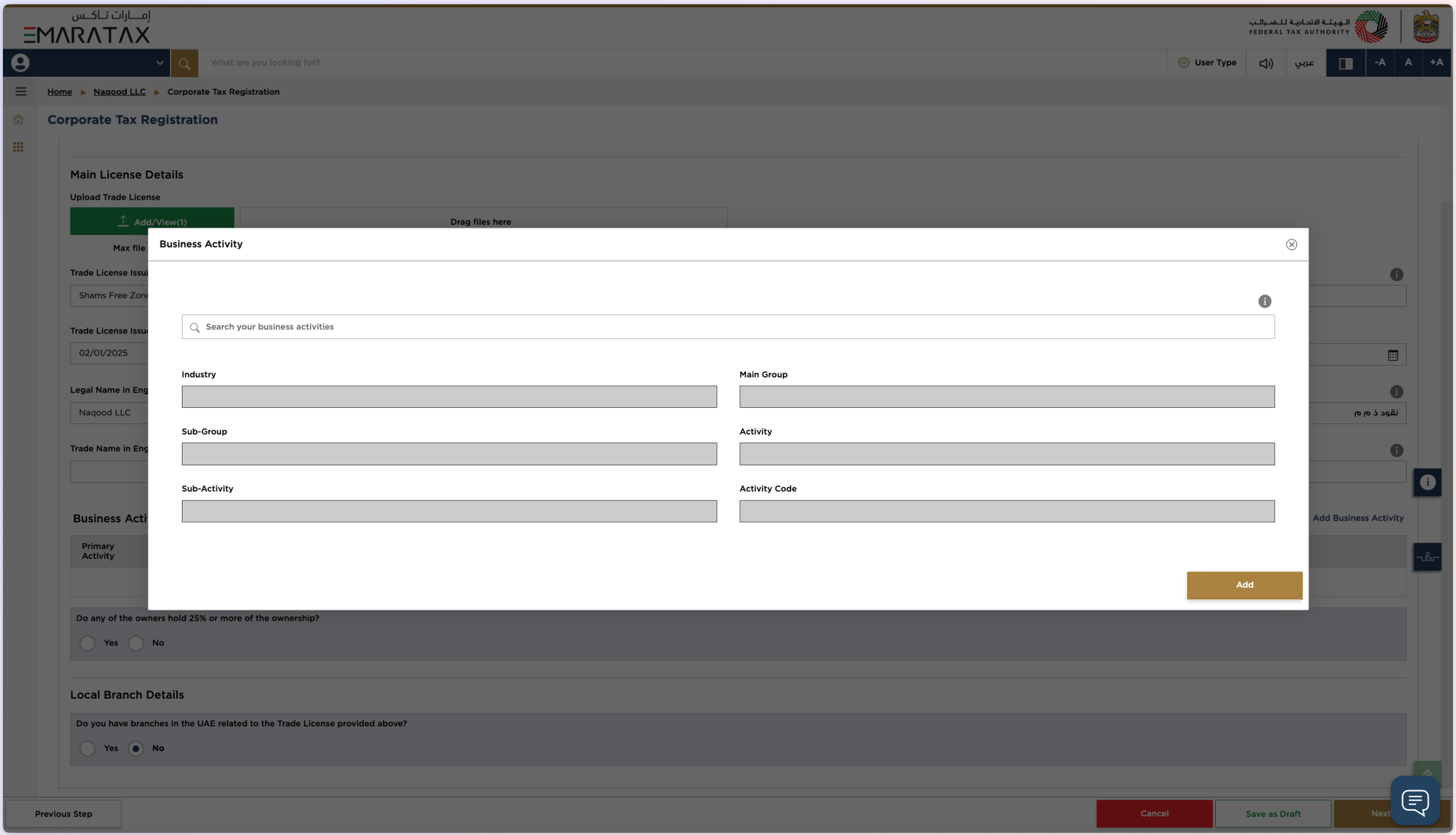
Step 7: Business Activity Details
Your business activity is listed on your Trade Licence.
If unsure, you can search the DED list here: Search DED Business Activities
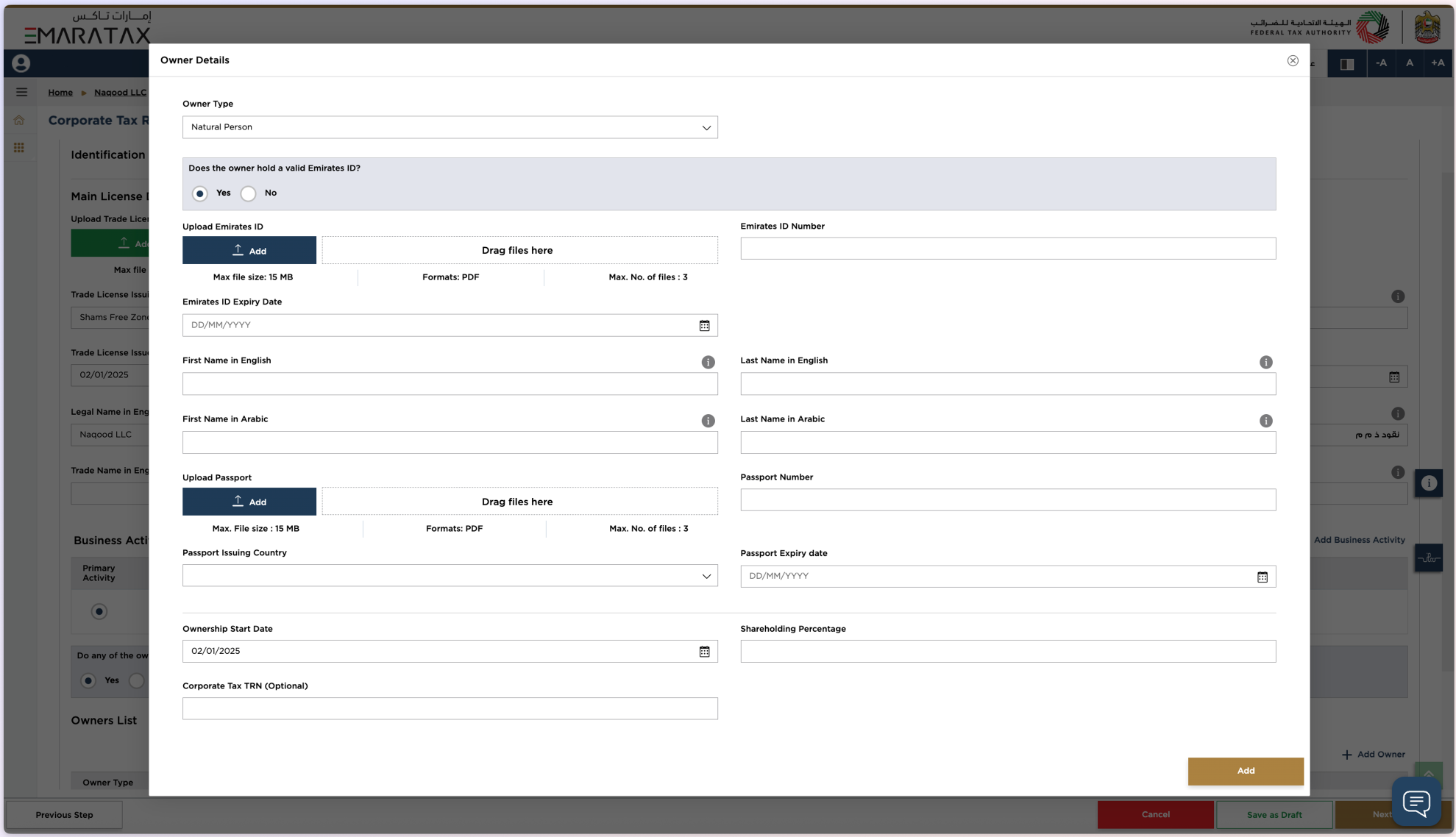
Shareholding Information
Do any owners hold 25% or more of the business?
Press Yes if applicable, or No if not.
If you selected Yes, provide the following:
- Owner Type:
- Natural Person (private individual)
- Legal Person (a company)
- First Name / Last Name
- Ownership Start Date
- Shareholding Percentage
- Corporate TRN
- Upload Emirates ID + Emirates ID Number
- Upload Passport + Passport Number
Branch Information
Do you have branches in the UAE related to this Trade Licence?
Press Yes or No accordingly.
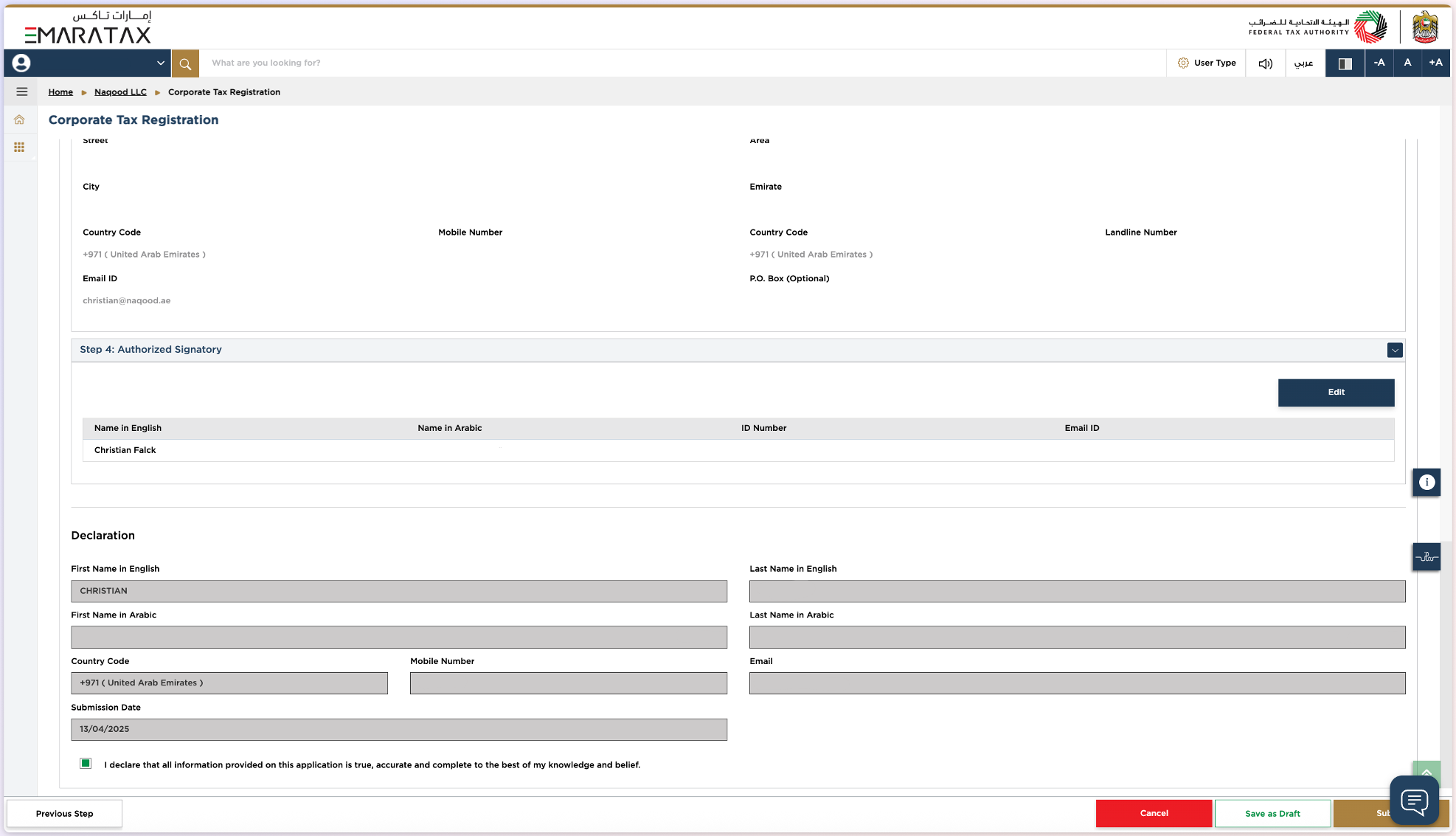
Step 8: Contact Details
Enter your physical address and communication details:
- Country
- Building Name and Number
- Street
- Area
- City
- Emirate
- Mobile Number
- Landline Number
- Email ID
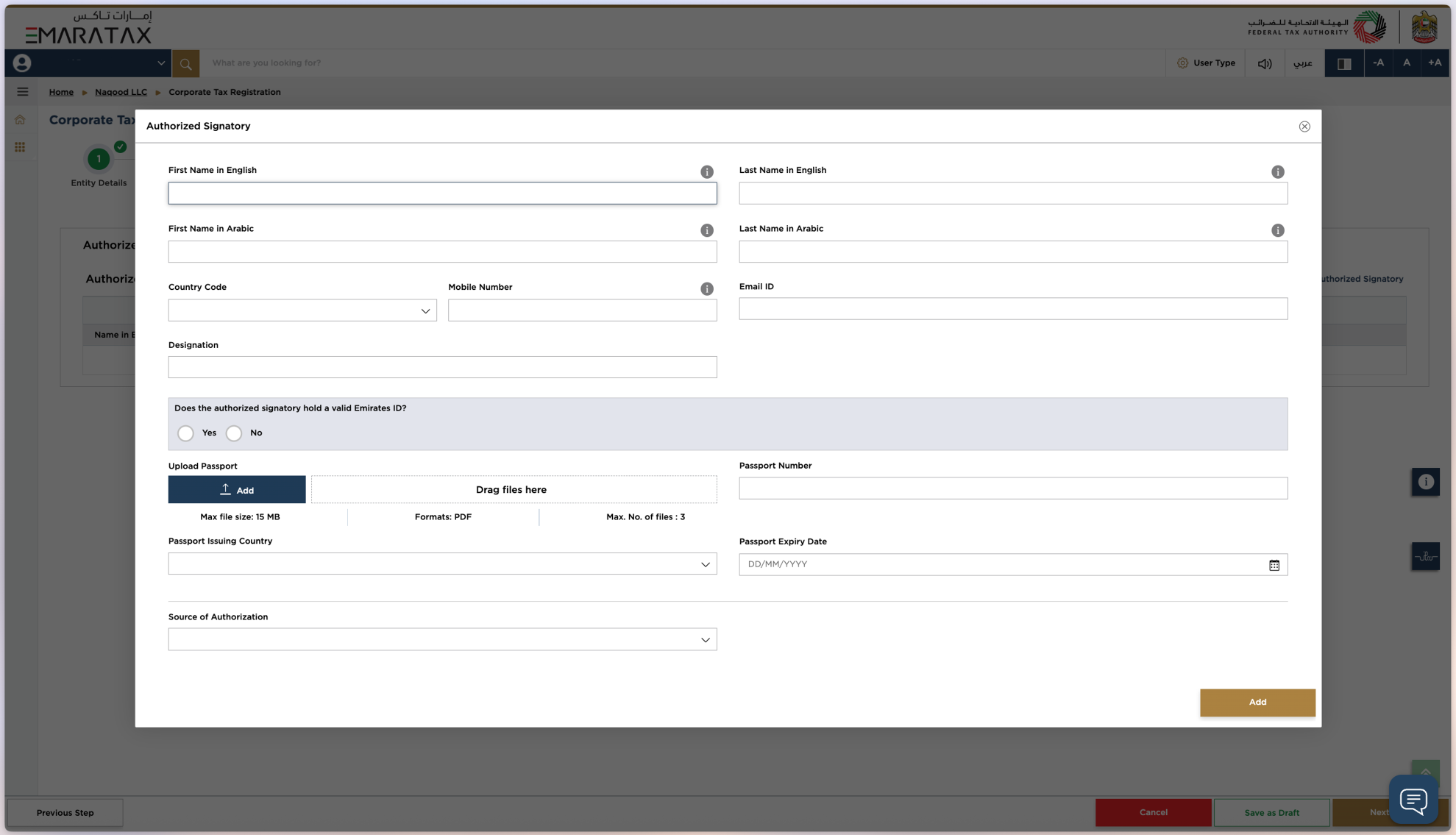
Step 9: Authorised Signatory Details
Enter the details of the person authorised to sign on behalf of the company:
- First and Last Name (English and Arabic)
- Mobile Number
- Email ID
- Designation
Does the authorised signatory hold a valid Emirates ID?
If Yes: Upload Emirates ID, Number, and Expiry Date
If No: Upload Passport, Passport Number, and Expiry Date
Source of Authorisation
- Upload Memorandum of Association
- Or upload Power of Attorney
- Specify the court and date of execution
Step 10: Review and Submit
Go over all the information you entered and click Submit. You will receive a confirmation email once your Corporate Tax registration is approved, together with your Tax Registration Number (TRN).
After you register: your first Corporate Tax return
Registration is only the first step. Your Corporate Tax return is due within 9 months from the end of each tax period. For a January to December tax period, that is 30 September of the following year. If you registered late, filing within 7 months instead also clears the AED 10,000 penalty under the waiver described above.
To file the return you need a profit and loss figure for the year, which means your invoices, expenses and bank transactions must be recorded and reconciled. Naqood is FTA accredited Corporate Tax and VAT software for UAE businesses, so your records are ready when the deadline comes. If you qualify for Small Business Relief, follow our guide on how to file Corporate Tax with Small Business Relief.
Frequently asked questions
Is Corporate Tax registration free in the UAE?
Yes. The FTA does not charge a fee for Corporate Tax registration on EmaraTax.
How long does Corporate Tax registration take?
The FTA estimates about 25 minutes to submit the application and up to 20 business days to process a complete application.
Do I need to register if my profit is below AED 375,000?
Yes. Every company subject to Corporate Tax must register, even if its taxable income is below AED 375,000 and taxed at 0%, or if it claims Small Business Relief.
Do Free Zone companies need to register for Corporate Tax?
Yes. Free Zone companies must register and file a return, even if they expect to be a Qualifying Free Zone Person paying 0% on qualifying income.
Do freelancers and sole traders need to register?
An individual running a business must register when business turnover in the UAE is above AED 1 million in a calendar year. Salary, private investment income and real estate investment income are not counted.
What happens if I register late?
The FTA charges an AED 10,000 penalty. It is waived if you file your first Corporate Tax return within 7 months from the end of your first tax period.
File VAT and Corporate Tax with FTA accredited software
Naqood prepares your VAT return and Corporate Tax figures from your invoices and bills, so filing takes less manual work. Start free, FTA accredited.